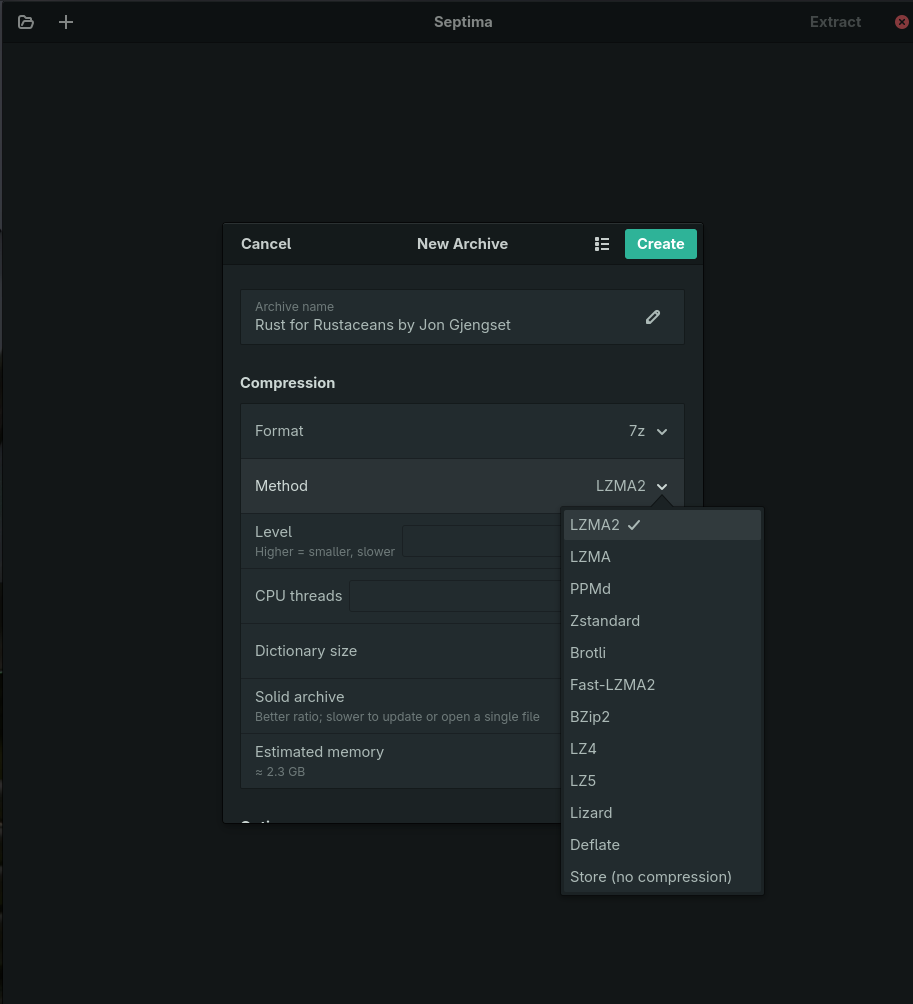
The Add-to-Archive dialog
Format × codec × level, with the level range reacting to the codec. Dictionary, solid mode, and threads — with a live memory estimate.
Modern codecs, first-class
Zstandard (1–22), Brotli, Fast-LZMA2, LZ4/LZ5, Lizard, plus LZMA2, PPMd, BZip2 — inside real .7z.
Architecture & filter picker
Delta, ARM64, ARM/ARMT, PPC, SPARC, RISC-V and BCJ2 alongside x86 BCJ — a real control, instead of the -m0=bcj folklore the Windows tool makes you learn.
Transparent modern tarballs
Create a real .tar.zst / .tar.xz / .tar.br — or Lizard, LZ4 and LZ5 — in one gesture, with full compression control.
Raw single-file streams
Write a bare .zst, .br, .lz4, .lz5, .xz, .gz or .bz2 — not only tar plus a compressor.
Lizard, properly exposed
Choose among Lizard's four method families (fastLZ4 / LIZv1, with or without Huffman) rather than guessing at one flat 10–49 slider.
Extract, safely
Live progress and cancel, encrypted-archive password prompts, and split-volume output.
Real encryption choices
AES-256 with optional encrypted file names for .7z — and AES-256 for zip instead of its weak ZipCrypto default.
Sandboxed by design
A Flatpak that ships 7zz and touches your files only through XDG portals — never the whole home directory.
Built-in checksum calculator
13 digests — CRC-32/64, MD5, SHA-1, SHA-256/384/512, SHA3-256/512, BLAKE3, BLAKE2sp and XXH32/64 — with copy and verify-against-a-checksum.
Named tuning presets
Save your codec/level/dictionary/threads setup once, reuse it on the next archive.
Post-extract actions
Jump straight to the extracted files with "Show in Files", or opt in to delete the archive afterwards.
One-click checksum file
Write a .sha256 alongside a new archive — one line per volume part, for split archives.
Edit an archive in place
Delete or rename entries directly, and verify integrity with a one-click "Test Archive".
Batch extract
Select or drop several archives at once — each unpacks into its own new folder, no per-archive prompts.
Batch compress
Stage several files or folders and create a separate archive for each one, saved right next to it.
Batch encrypt, one password each
Every archive in a batch gets its own random 64-character password, recorded in a passwords file you keep wherever you keep secrets — no vault API, no lock-in.
…and the whole set back
Open that passwords file later — button, drag, or command line — and Septima extracts every archive it lists with its recorded password. Or tick just the two you need.
Protect the passwords file
Leave it as readable JSON, or give it a password of its own — standard OpenPGP via gpg -c, so any gpg anywhere opens it. Chosen before the run, so a protected run never writes plaintext.
Drag entries out to extract
Select rows in an open archive and drag them into Files — they arrive extracted, folders with their whole subtree.